CURL(Client URL)

Introduction
cURL basically stand for Client URL.
its used to send direct request to the server from command line tools and transfer data between the client and server.
What is cURL?
cURL is one of the way we can directly do a request from the terminal and get response from the server.
example like
curl https://example.com
when client request to the server or browser through this command on terminal, its fetch the website example.com and show the website content on the terminal.
when user request for the webpage thought the terminal browser process the request and send the response with status code.
like example
status code 200 OK (success), 404 Not Found, 500 Server Error
and return data in specific format in that case its return the HTML pages.
Request from the Client to Server
GET →
A GET request is used to fetch or retrieve data from the server.
It does not change anything on the server.
Example: Opening a webpage.
POST →
A POST request is used to send data to the server.
Commonly used for submitting forms or creating new records.
Working of cURL
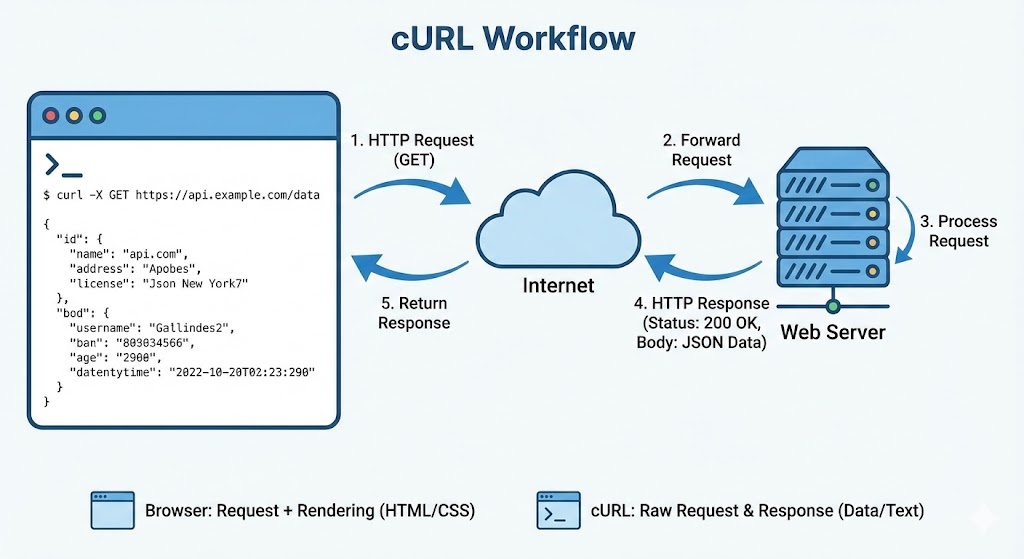
You run a cURL command in terminal
cURL sends an HTTP request to a server
The server processes the request
Server sends back a response
cURL displays that response on your screen
example
when client request for the curl google.com request data show in the terminal send from the browser.
Conclusion
cURL is a simple command-line tool that sends HTTP requests to a server and displays the response. It is mainly used for testing APIs, transferring data, and interacting with web services quickly and easily.